Everyone says bots make money. Here are the receipts.
This isn’t a theory post. It’s not a whitepaper. Before you install a single thing, we’re going to show you real wallets with real profits — publicly verifiable on the Polymarket blockchain. Not backtests. Not paper trades. On-chain, immutable proof that anyone can verify in 30 seconds.
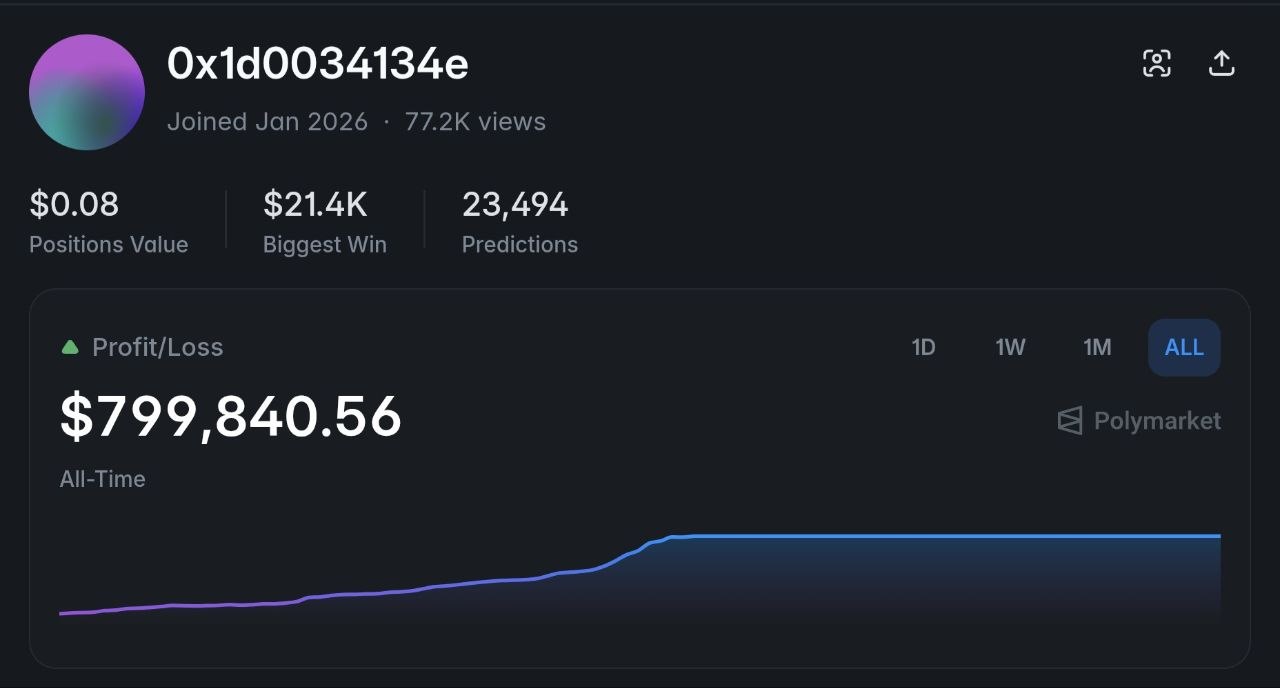
$799,840+
All-time profit — single wallet, automated trading (23,494 predictions)
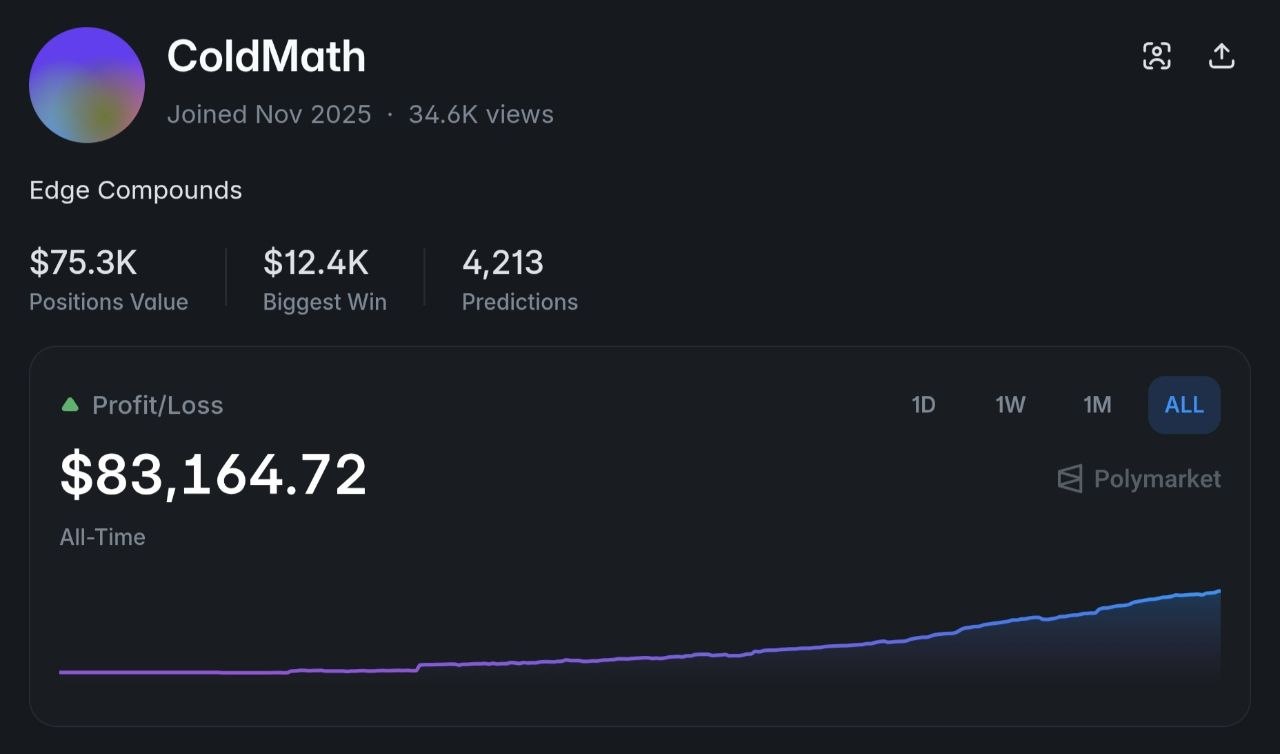
ColdMath: $83,164.72 all-time profit. 4,213 predictions. $75.3K still in positions.
Verify on-chain →
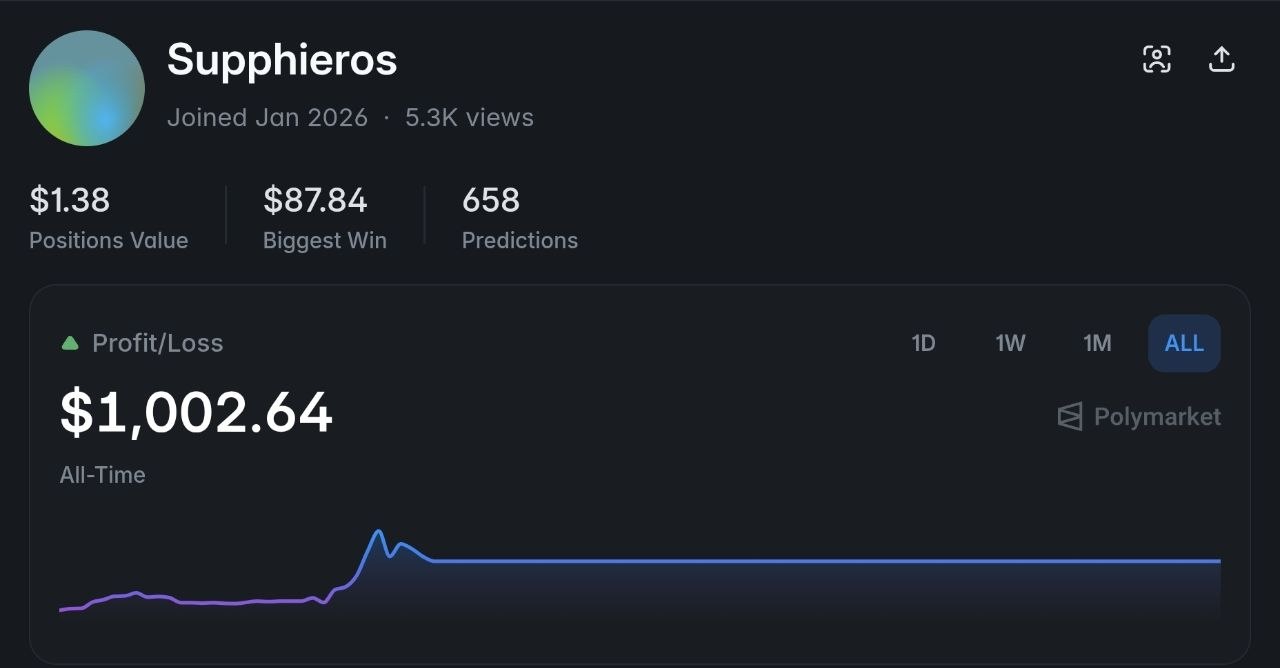
Supphieros: $1,002.64 all-time profit. Started small. 658 predictions.
Verify on-chain →
These are on-chain, publicly verifiable profits from automated trading bots running on Polymarket — the world’s largest prediction market. Click the links above. Check the wallets yourself. The blockchain doesn’t lie.
The bot framework we’re using is called OpenClaw. It’s fully open source, has 335K+ stars on GitHub, and powers thousands of trading agents worldwide.
What is Polymarket?
Polymarket is the world’s largest prediction market. People bet on real-world outcomes — elections, weather, crypto prices, sports, and more. Markets resolve based on
facts, not opinions. If you can predict an outcome more accurately than the crowd, you make money. That’s where bots come in — they can analyze data faster and more accurately than any human, 24 hours a day.
The strategies are straightforward. The setup takes 30-45 minutes. And this guide will walk you through every single screen you’ll see along the way.
Let’s build.
The 3 AM Problem
Your bot just found a 12% mispricing in the NYC weather market. It’s 3 AM. You’re asleep. The window closes in 8 minutes.
That trade just happened. Your bot took it. You woke up to a Telegram notification: +$47 on NYC Weather YES at 0.62, sold at 0.74.
That’s the real reason bots win. Not because they’re smarter than you. Because they’re there.
You, the Human
- Awake ~16 hours. Markets move 24.
- Trade #1 at 9 AM: sharp, disciplined, focused
- Trade #47 at 11 PM: tired, sloppy, “just one more”
- A loss at 2 PM poisons every decision until you sleep
- Analyzing one market means missing 200 others
- Live in one timezone. Markets are global.
- Eat dinner. Watch a show. Lose $300 because you weren’t watching.
Your Bot
- Awake always. Every market. Every minute.
- Trade #1 and trade #1,000 are equally precise
- No fatigue, no tilt, no revenge trades, no “gut feel”
- Previous losses don’t affect the next decision. Ever.
- Scans 500+ markets simultaneously
- Operates in every timezone at once
- You eat dinner. Bot makes $47 while you chew.
It’s not about intelligence. It’s about presence.
Between April 2024 and April 2025, automated traders extracted an estimated
$40 million in arbitrage profits from Polymarket — mostly from pricing inefficiencies that lasted minutes. (
Source: arxiv.org) The opportunities were there for everyone. The bots were the only ones awake.
Weather markets update every few hours. BTC price markets resolve every 5 minutes. FOMC and CPI markets reprice overnight. That’s hundreds of trading opportunities per day, scattered across every timezone. No human can monitor all of them. A bot doesn’t have to try — it just does.
Beyond the Basics: 3 Advanced Strategies
The starter strategies — Weather Trader, BTC Fast Loop, Copy Trading — are how you learn the system. These three are how you scale. Each one exploits a different structural weakness in how prediction markets are priced.
4
The Fade — Mean Reversion on Overreactions
RISK: MEDIUM • CAPITAL: $500+ • TRADES: 3-8/WEEK
When news breaks, prediction markets overreact. A tweet, a headline, a rumor — retail traders pile in and push the price way past fair value. Then it reverts. The Fade catches the reversion.
How it played out
Tariff announcement rumors push “US recession in 2026” from 35¢ to 58¢ in 2 hours. Retail panic. Twitter threads. Cable news segments. Within 6 hours, the actual probability hasn’t changed — only sentiment did. Price settles back to 41¢. The Fade bot bought NO at 42¢ during the peak panic and sold when the market calmed down. That’s a 15¢ swing on a position that was live for 4 hours.
Why it works: Prediction markets have no institutional market makers actively stabilizing prices. When retail traders panic-buy on a headline, there’s nothing pushing the price back to fair value — except time and cooler heads. Research shows whale manipulation creates “artificial mispricing that sharp traders can exploit for positive expected value.”
How the bot executes:
- Monitors high-volume markets for sudden price movements (>15% in <2 hours)
- Cross-references the move against actual resolution criteria — is this real news or noise?
- If noise → enters a contrarian position near the peak
- Targets 60-70% reversion (doesn’t need full mean reversion to profit)
- Hard stop-loss at 2x expected reversion — if the move continues, cut losses fast
Best markets: Political events, crypto regulation rumors, recession/inflation markets — anything where headlines drive short-term panic but resolution is weeks or months away.
The risk
You’re betting against momentum. Sometimes the “overreaction” turns out to be correct. Never put more than 5% of your bankroll on a single fade. The math works over 20+ trades, not any individual one.
5
Cross-Market Arbitrage — Exploiting Logical Mispricing
RISK: LOW • CAPITAL: $1,000+ • TRADES: 5-15/WEEK
Polymarket has hundreds of markets that are logically connected but priced by independent order books. When related markets contradict each other, you can lock in profit with near-zero risk.
$40 million in proven arbitrage profits
A study of 86 million bets between April 2024 and April 2025 found over 7,000 mispriced market pairs on Polymarket. Traders who exploited these generated an estimated
$40 million in arbitrage profits. (
Source: arxiv.org)
Examples of logical connections your bot exploits:
| Market A | Price | Market B | Price | The Problem |
|---|
| “BTC above $100K by June” |
45¢ |
“BTC above $95K by June” |
40¢ |
If BTC is above $100K, it’s definitely above $95K. Market B must be ≥ Market A. |
| “Fed cuts rates in June” |
30¢ |
“Fed cuts rates by September” |
25¢ |
September encompasses June. If June is 30¢, September must be ≥ 30¢. |
| “Trump wins presidency” |
55¢ |
“Republican wins presidency” |
50¢ |
Trump winning implies Republican winning. Republican ≥ Trump. Always. |
How the bot executes:
- Scans all active markets and builds a dependency graph (which markets logically imply which)
- Compares prices of connected markets every 60 seconds
- When a pair violates logical consistency → enters both sides simultaneously
- Holds until resolution or until the mispricing corrects
- Target: 0.5-3% per trade, but on near-zero risk
Why it keeps working: New markets appear every day. Polymarket has no cross-market pricing engine — each order book is independent. Even as old mispricings get corrected, fresh ones appear with every new market launch.
Speed matters
True arbitrage windows close fast — sometimes in minutes, sometimes seconds. This is where having a bot scanning 24/7 is non-negotiable. By the time a human spots the mispricing, opens two tabs, and does the math, the window is gone.
6
Catalyst Calendar — Pre-Positioning Before Scheduled Events
RISK: MEDIUM-LOW • CAPITAL: $300+ • TRADES: 8-12/MONTH
Some market-moving events are scheduled months in advance — FOMC meetings, CPI releases, jobs reports, court rulings, primary elections. Markets that resolve based on these events follow a predictable pricing pattern that your bot can exploit.
2-4 Weeks Out
Loose pricing, low volume, wide spreads. Best entry.
1 Week Out
Smart money enters. Volume picks up. Pricing tightens.
24-48 Hours
Retail piles in. Price often overshoots consensus.
Post-Event
Resolution. Instant reprice. Collect.
Example: Monthly CPI Release
Every month, BLS releases CPI data at 8:30 AM ET. Markets like “CPI above 3.5% in March” are active for weeks but pricing is inefficient until ~48 hours before release. The bot checks Cleveland Fed Nowcast and BLS consensus estimates, then enters when the market price diverges more than 5% from statistical consensus. On release day, the market snaps to reality — and your position pays.
How the bot executes:
- Maintains a calendar of scheduled events (FOMC, CPI, NFP, earnings, court dates, primaries)
- 48-72 hours before each event, compares market price to publicly available consensus data
- If market diverges >5% from consensus → enters position
- Takes profit immediately after event resolution
- Tight 3-5% stop-loss to limit downside when consensus is wrong (~20-30% of the time)
Why this is underexploited: The data is public. Cleveland Fed Nowcast, CME FedWatch, BLS consensus — all free. But most Polymarket retail traders don’t check economic forecasting tools. They trade vibes. Your bot trades data.
Best markets: FOMC rate decisions (8 per year), monthly CPI/PPI/NFP releases (12 each), scheduled court rulings, primary elections, known corporate announcements.
6 strategies, one system
Beginner strategies (Weather, BTC Fast Loop, Copy Trading) get you live and learning.
Advanced strategies (The Fade, Cross-Market Arb, Catalyst Calendar) are where the real scaling happens. The complete guide covers configuration for all six — including which ones to run together and how to allocate capital across them.
AI Model Cost Breakdown
Your trading bot needs an AI brain to analyze markets and make decisions. Here’s what each option costs and when to use it:
| Model |
Monthly Cost |
Speed |
Quality |
Best For |
ChatGPT Plus
(OpenAI) |
$20/mo flat |
Fast |
Excellent |
Beginners — simplest setup |
Claude Haiku
(Anthropic API) |
~$5-$15/mo |
Very Fast |
Good |
High-frequency — cheapest per call |
Claude Sonnet
(Anthropic API) |
~$15-$40/mo |
Fast |
Excellent |
Best balance of cost & quality |
GPT-4o-mini
(OpenAI API) |
~$5-$15/mo |
Very Fast |
Good |
Budget option with good reasoning |
Claude Opus
(Anthropic API) |
~$50-$200/mo |
Slower |
Best |
Complex event analysis only |
Recommendation for beginners
Start with
ChatGPT Plus. It’s the simplest. Flat $20/mo, no API keys to manage, no usage tracking to worry about. Just log in and go. Once you’re profitable and understand the system, switch to
Claude Haiku for lower per-trade costs at scale.
Why does the AI model matter?
Your bot uses the AI model to analyze market conditions, read weather data, evaluate price momentum, and decide whether to buy or sell. A faster model means quicker decisions. A better model means more accurate decisions. For most beginners, ChatGPT Plus is more than enough — you’re not doing brain surgery, you’re reading weather forecasts.
1Get a VPS (Virtual Private Server)
Your bot needs to run 24/7. Your laptop won’t cut it — it sleeps, it updates, it loses WiFi at the worst possible moment. A VPS is a server in the cloud that never turns off...
2Install Required Software
Your VPS needs three tools installed: Python, Git, and Node.js. These are standard developer tools...
3Install OpenClaw
OpenClaw is the open-source AI agent framework that powers your trading bot...
Get the Complete Guide
The full guide includes all 9 setup steps with 27 screenshots, every terminal command, configuration for all 6 trading strategies, the $1,000/day scaling framework, risk management rules, and Week 1 expectations.
DIY Setup
$29
one-time payment
- ✓ Complete 9-step guide with 27 screenshots
- ✓ Every command, every setting, every config
- ✓ 6 trading strategies (Weather, Fast Loop, Copy, Fade, Arb, Catalyst)
- ✓ $1,000/day scaling framework
- ✓ Risk management rules
- ✓ Lifetime updates
Get the Guide →
POPULAR
Done For You
$997
one-time setup
- ✓ Everything in the guide, done for you
- ✓ Full VPS deployment + server hardening
- ✓ OpenClaw + Simmer + strategies configured
- ✓ Custom risk params for your bankroll
- ✓ Telegram trade alerts & bot monitoring
Get Your Bot Deployed →
Questions? Message us on Telegram @NexasHub